RAG with Spring Boot: Building Retrieval-Augmented Generative AI in Java
Large Language Models are impressive—but unreliable when used alone.
They hallucinate.
They lack domain context.
They don’t know your internal data.
This is why Retrieval-Augmented Generation (RAG) has become the default architecture for production AI systems.
In this article, we’ll explain how Java developers build RAG systems using Spring Boot and Spring AI, focusing on architecture, data flow, and backend design—not toy demos.
Why RAG with Spring Boot Exists (And Why LLMs Alone Are Not Enough)
Out-of-the-box LLMs:
Are trained on static, public data
Cannot access private or real-time information
Confidently generate incorrect answers
This is unacceptable in:
Enterprise systems
Internal tools
Knowledge platforms
Support and operations workflows
RAG solves this by grounding AI responses in real data.
Instead of asking the model to “know everything,” we:
Retrieve relevant information
Provide it as context
Let the model generate an answer based on that context
What Is Retrieval-Augmented Generation (RAG)?
Retrieval-Augmented Generation is an AI pattern where:
A language model retrieves external information before generating a response.
At a high level:
User submits a query
Relevant documents are retrieved
Retrieved content is injected into the prompt
The LLM generates an answer grounded in that data
This transforms LLMs from guessing engines into reasoning engines.
Why Spring Boot Is a Natural Fit for RAG
RAG is not a single feature—it’s a pipeline.
It involves:
Data ingestion
Embedding generation
Vector storage
Query-time retrieval
Prompt construction
Model invocation
Observability and cost control
Spring Boot excels at exactly this kind of system orchestration.
With Spring Boot, RAG becomes:
Secure
Observable
Maintainable
Scalable
Spring AI adds the missing abstraction layer for AI components.
Core Components of a RAG with Spring Boot
Let’s break down the RAG pipeline as it typically appears in a Spring Boot application.
1. Document Ingestion
Before RAG can work, your data must be ingested.
Common sources include:
PDFs
Knowledge base articles
Markdown or HTML files
Database records
Internal documentation
In Spring Boot, ingestion is usually handled:
As a batch job
Via scheduled tasks
Through admin-only APIs
Key rule: ingestion happens outside the request path.
2. Text Chunking
Large documents must be split into smaller chunks.
Why?
LLMs have context limits
Smaller chunks improve retrieval accuracy
Chunking decisions affect:
Retrieval precision
Latency
Token usage
This is an architectural decision, not a prompt tweak.
3. Embedding Generation
Each chunk is converted into an embedding—a numerical representation of its meaning.
Embeddings allow:
Semantic similarity search
Meaning-based retrieval (not keyword matching)
Spring AI provides Java-friendly abstractions for embedding generation, keeping this logic out of controllers and UI code.
4. Vector Store
Embeddings are stored in a vector database.
The vector store enables:
Fast similarity search
Scalable retrieval
Efficient query-time access
In Spring Boot, vector stores are treated like infrastructure components—similar to relational or NoSQL databases.
5. Query-Time Retrieval
When a user submits a query:
The query is converted into an embedding
The vector store is searched
Top-K relevant chunks are returned
This retrieval step is what grounds the AI response.
No retrieval → no RAG.
6. Prompt Construction
Retrieved context is injected into a prompt template.
Production prompts typically include:
System instructions
Retrieved documents
User question
Constraints or formatting rules
Spring AI encourages structured prompt handling instead of string concatenation.
7. LLM Invocation
The assembled prompt is sent to the chat model.
The model:
Reads the provided context
Generates a response based on that data
Reduces hallucination risk
The LLM is reasoning—not inventing.
8. Post-Processing & Validation
Before returning the response:
Validate output format
Apply safety rules
Log metadata (not raw content)
Spring Boot’s exception handling and logging make this manageable.
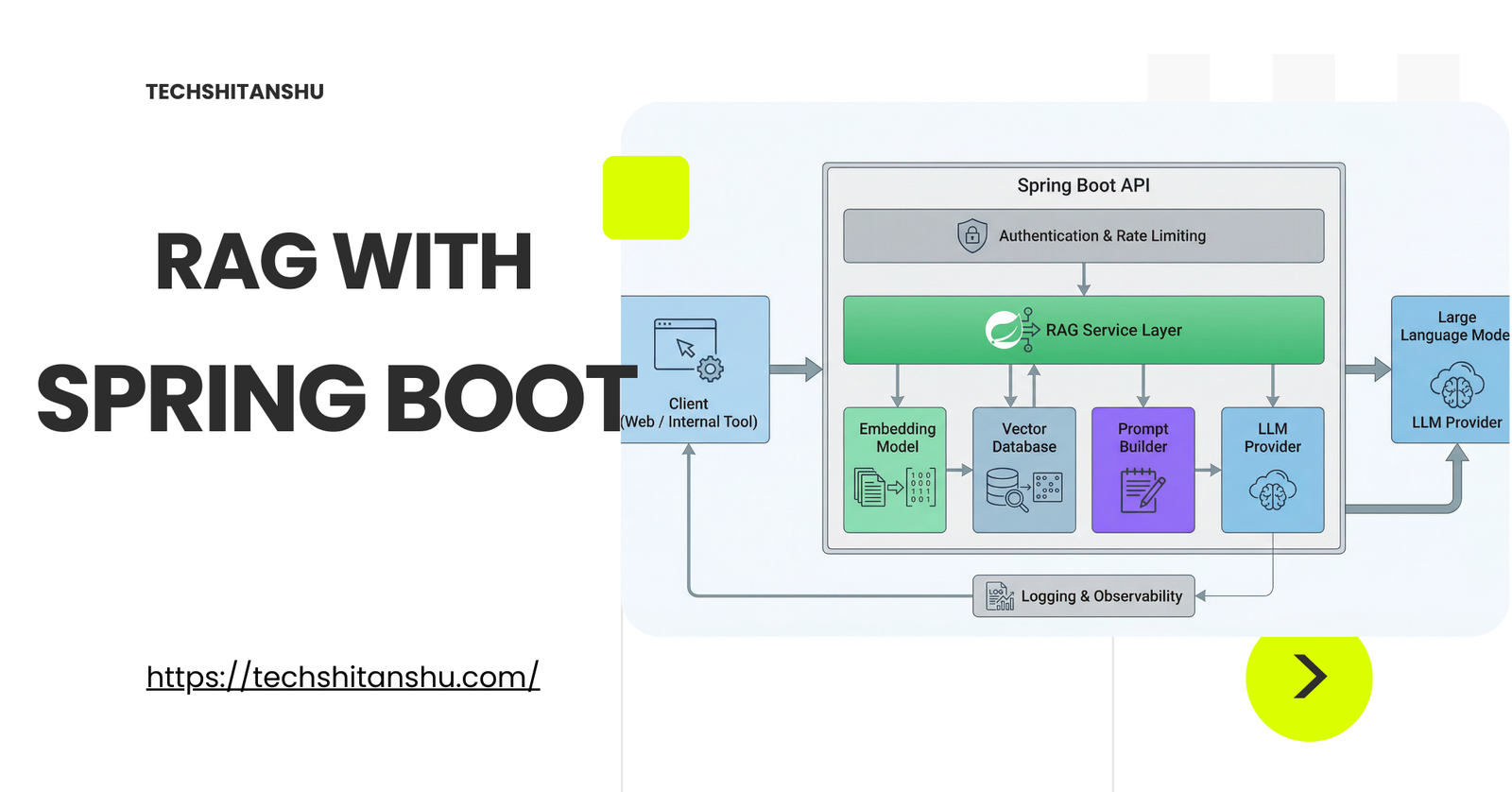
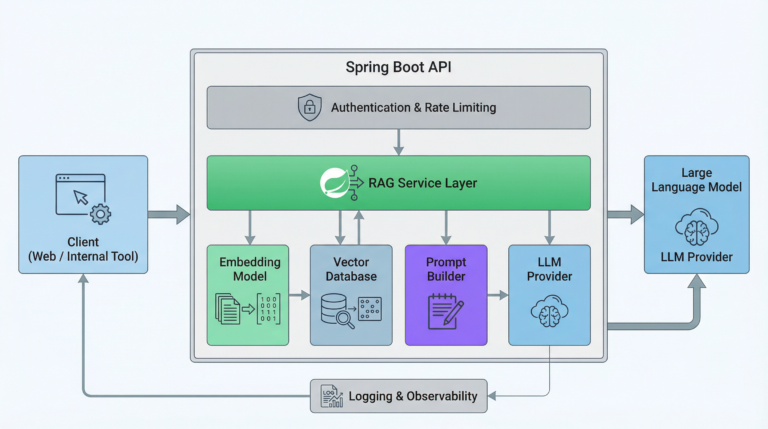
Typical RAG with Spring Boot
A production RAG system usually looks like this:
Client sends query
Spring Boot API authenticates request
Service layer orchestrates RAG pipeline
Embedding service processes the query
Vector store retrieves relevant context
Prompt builder assembles the final prompt
Spring AI calls the LLM
Response is returned to the client
Each step is isolated, testable, and observable.
Why RAG Reduces Hallucinations
LLMs hallucinate when they:
Lack context
Are forced to guess
Are asked questions outside their knowledge
RAG fixes this by:
Supplying verified data
Narrowing the answer space
Making uncertainty explicit
RAG does not eliminate hallucinations—but it dramatically reduces them.
Performance and Latency Considerations
RAG adds extra steps:
Embedding lookup
Vector search
Spring Boot applications should:
Cache frequent queries
Limit retrieved chunks
Monitor response times
Treat AI calls as expensive downstream services
Latency must be managed intentionally.
Security Considerations in RAG Systems
RAG introduces new risks:
Data leakage
Prompt injection
Unauthorized access to documents
Best practices include:
Role-based document access
Sanitizing retrieved content
Never embedding secrets
Authenticating all AI endpoints
Spring Security integrates naturally into this flow.
Common Mistakes When Implementing RAG
Teams often fail by:
Using RAG only at prompt level
Re-embedding data on every request
Skipping observability
Treating vector stores as optional
Ignoring data freshness
RAG is an architecture, not a trick.
How RAG Fits into the Generative AI with Spring Series
This article builds on:
Foundations of Generative AI (for Java Developers)
What Is Spring AI? Architecture & Components
Building Generative AI Applications with Spring Boot
Next articles will cover:
Vector databases in Java
Chunking strategies
RAG performance tuning
AI microservices patterns
Together, these form a complete learning path.
What’s Next in the Series
 Spring AI code examples.
Testing RAG pipelines in Spring Boot
Performance tuning & caching for RAG
Vector DB comparison for Java (Pinecone vs PGVector vs Redis)
Final Thoughts
RAG is the difference between:
AI demos
andAI systems you can trust
For Java developers, Spring Boot + Spring AI makes RAG:
Structured
Maintainable
Production-ready
If Generative AI is entering your backend stack, RAG is not optional—it’s foundational.
 Bookmark this guide — it’s the mental model you’ll reuse throughout the series.
FAQ
❓ What is Retrieval-Augmented Generation (RAG)?
Retrieval-Augmented Generation is an AI pattern where a language model retrieves relevant data from external sources before generating a response. This allows AI systems to answer using up-to-date and domain-specific information instead of relying only on training data.
❓ Why is RAG important for production AI systems?
RAG reduces hallucinations and improves accuracy by grounding AI responses in real data. This is critical for enterprise systems where incorrect answers can lead to operational or business issues.
❓ How does RAG work in a Spring Boot application?
In a Spring Boot application, RAG typically involves generating embeddings for documents, storing them in a vector database, retrieving relevant context at query time, and injecting that context into prompts sent to an LLM using Spring AI.
❓ Do Java developers need Python to build RAG systems?
No. Java developers can build complete RAG pipelines using Spring Boot and Spring AI. These frameworks provide Java-native abstractions for embeddings, vector stores, and LLM integration.
❓ What vector databases work with Spring AI?
Spring AI supports multiple vector store integrations, including in-memory stores and external databases. This allows Java teams to choose storage based on scale, latency, and operational needs.
❓ What are common challenges when implementing RAG?
Common challenges include choosing chunk sizes, managing embedding updates, controlling latency, and ensuring retrieved context is relevant. These challenges require architectural decisions, not just prompt tuning.

Leave a Reply